Sales Playbook
A solution-forward field guide for positioning Trendzact Sensitive Data Exposure Control around the five buyer-facing solution areas: Secure Workspace, Identity Recognition Assurance, Secure Virtual Meeting, Insider Threat Management, and Exposure Data Loss Prevention.
Access permission does not grant exposure permission.
Trendzact controls sensitive data exposure after access is granted and data becomes visible. The platform helps buyers understand, decide, and act in real time across the human edge.
Solution-Forward Narrative
Start with the exposure moment
Sensitive data risk begins when information becomes visible on a screen, in a workspace, across multiple monitors, or during collaboration. Start the conversation there—not with tools, telemetry, or features.
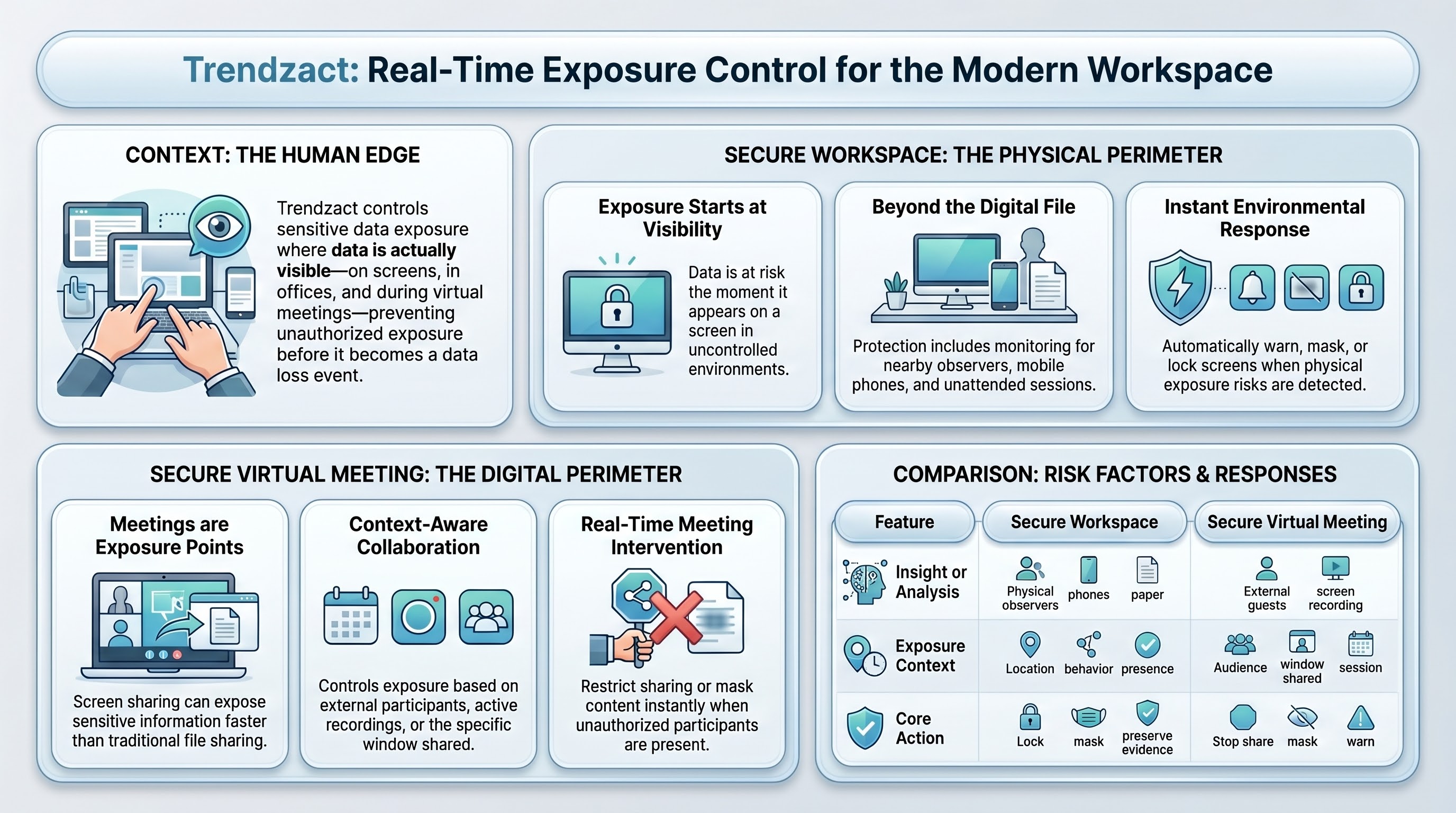
Use the exposure moment to determine whether the buyer’s primary risk is physical workspace exposure, virtual meeting exposure, user behavior, visible-data handling, or a combination of these conditions.
- The exposure source may be physical, virtual, or both.Does your exposure risk come more from the physical environment around the user, the virtual audience in the meeting, or both?
- High-risk users often expose data across screens and meetings.Are your highest-risk users exposing sensitive information across both monitors and meetings?
- Exposure investigations need correlated context.Can you currently correlate workspace context, participant context, visible data, and user action in one investigation?
- Access controls do not always govern exposure.Are your current tools stronger at governing access than governing what happens after access is granted?
- The first priority should follow the dominant exposure moment.Would your first priority be to control exposure in workspaces, meetings, or high-risk user groups that do both?
Frame the buyer’s control gap
Most controls govern access, storage, classification, sharing, or transfer. The control gap appears after access is granted, when sensitive data becomes visible and the buyer cannot prove whether the exposure context was acceptable.
Frame the gap around what the buyer cannot currently see, correlate, prove, or act on in real time.
Map to one lead solution
Use the buyer’s most urgent exposure condition to lead with one solution area, then expand to adjacent modules as the risk picture becomes clearer.
Close on real-time action
Trendzact turns silent exposure uncertainty into proof, context, and governable action: warn, mask, restrict, lock, escalate, preserve evidence, or trigger a workflow.
Five Solution Areas
Lead with the solution area that best matches the buyer’s visible-data exposure problem.
Control exposure in physical and remote workspaces
Use when buyers worry about observers, phones, cameras, paper, unattended screens, public workspaces, home offices, or high-value confidential work. Webcam-enabled endpoints are required; the Trendzact Ultrawide Webcam is recommended for mission-critical workspace deployments.
Prove who is present during sensitive exposure
Use when buyers need more than login authentication. The question is whether the right person is present now, while sensitive data is visible. Webcam-enabled endpoints are required.
Control exposure during collaboration
Use when sensitive data is shared in meetings with internal users, customers, vendors, external participants, screen shares, or recordings.
Detect risky behavior around visible data
Use when buyers need to detect negligent, stealthy, privileged, repeated, or malicious behavior before exposed information becomes data loss.
Extend DLP to visible data exposure
Use when buyers already have classification, DLP, or CASB controls but still cannot control what users see, capture, copy, share, or expose on screen.
Need a one-screen solution overview?
Use the generic Solutions infographic when the buyer is still exploring which solution area fits their exposure problem.
Discovery Questions
Use these to diagnose the buyer’s lead solution area.
Identify the exposure condition
- When sensitive data is visible, what could go wrong before a file is transferred?
- Which workspaces or user groups handle the most sensitive visible information?
- Where do external participants, observers, phones, recordings, or screen sharing create risk?
- Can you prove what was visible, who was present, and what action was taken during an incident?
Map to the first solution
- Workspace or observer risk → lead with Secure Workspace.
- Active-session user confidence → lead with Identity Recognition Assurance.
- Sensitive collaboration risk → lead with Secure Virtual Meeting.
- Repeated risky behavior → lead with Insider Threat Management.
- Visible data outside file-transfer control → lead with Exposure Data Loss Prevention.
Deal Motion by Stage
Business Case
Use reports, infographics, and decks to link exposure control to audit, risk, and operational outcomes.
Open Resources →Proposal
Package the lead solution, adjacent modules, and enhancements based on the buyer’s exposure profile.
Build Proposal →Talk Track
“Most security tools answer whether someone had access. Trendzact answers what happened after access was granted: what sensitive data was visible, who was present, where exposure occurred, whether the context was acceptable, and what action should happen in real time.”
Objection Handling
“This feels like surveillance.”
Reframe to policy-governed exposure control. Trendzact is designed to prove and control specific exposure conditions, not to create unmanaged employee monitoring.
“We already have DLP or Purview.”
Position EDLP as an extension. Purview and DLP help classify and govern data; Trendzact controls what happens when sensitive data becomes visible at the human edge.
“Our SOC cannot handle more alerts.”
Lead with context and action. Trendzact correlates visibility, presence, environment, behavior, and evidence so teams can focus on high-confidence exposure events.
“Can meeting platforms do this?”
Meeting platforms manage collaboration. Trendzact governs sensitive data exposure inside the collaboration moment, including participants, screen sharing, recordings, and evidence conditions.